
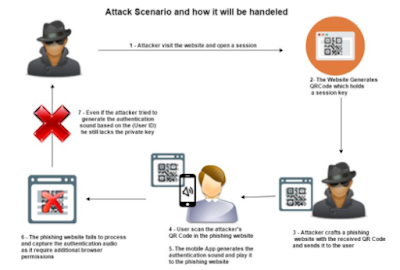
Follow the instruction below to learn how to install and use QRLJacking. You will need Linux and Python 3.7 or higher for this to work.
- Update Firefox browser to the latest version
- Install the latest geckodriver from https://github.com/mozilla/geckodriver/releases and extract the file then do :
chmod +x geckodriversudo mv -f geckodriver /usr/local/share/geckodriversudo ln -s /usr/local/share/geckodriver /usr/local/bin/geckodriversudo ln -s /usr/local/share/geckodriver /usr/bin/geckodriver
- Clone the repo with
git clone https://github.com/OWASP/QRLJackingthen docd QRLJacking/QRLJacker - Install all the requirements with
pip install -r requirements.txt - Now you can run the framework with
python3 QrlJacker.py --help
More information about QRLJacking can be found HERE
Watch the video above if you are still confused about anything.


0 comments:
Post a Comment